
Sterling / Networking / Structured wiring
Structured wiring, Monroe GA
Cat6A and fiber pulled to every room that will ever need it, home run to a central panel and labeled before anything closes up. It is the least visible part of the house and the part everything else quietly depends on.
Structured wiring is the physical cabling that everything else in the house connects to, and it only gets one real chance to be done right, while the walls are still open. Done well, it is invisible: a labeled panel in a closet somewhere, and every device in the house simply works. Done poorly, or skipped and retrofitted later, it becomes the reason a camera drops out, a Wi-Fi signal is weak in one wing, or adding one more television means opening a finished wall.
How the runs are actually laid out
This single decision, made once at rough-in, is the difference between a network that is easy to troubleshoot and one that fails in ways nobody can trace.
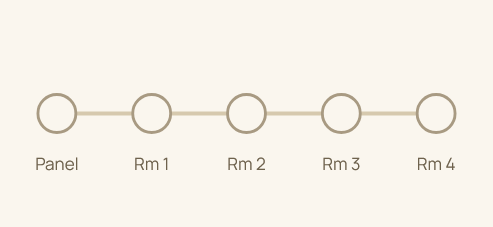
Each room connects to the next rather than back to a central point. A failure anywhere in the chain can affect every room after it, and finding the actual problem means checking each connection along the way.
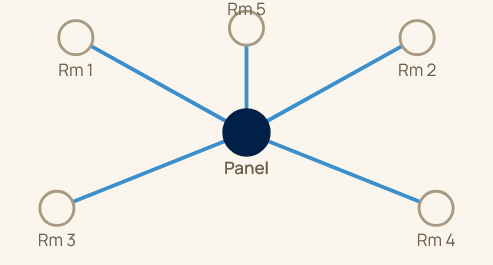
Every run is independent, home to the same central panel. A problem in one room stays in that room, and the panel shows at a glance which run is which, since every cable is labeled at both ends.
What actually runs through the walls
Most rooms get some combination of these, matched to what that room is likely to need, not run identically everywhere out of convenience.
The standard for network data, cameras, access points, and anything that needs speed and reliability.
For longer runs or a detached structure, where copper starts to lose signal over distance.
Run alongside the data cabling to every zone at the same time, not added later as a separate project.
The right mix is a conversation, not a checklist. A home office might get an extra data run for a future desk setup nobody has decided on yet. A media room gets planned in far more detail, since the audio, video, and network demands are all concentrated in one place. Deciding this at blueprint, with the whole house in view at once, is what keeps the wiring plan matched to how the house will actually be lived in rather than a generic default applied to every room.
How it gets built
Which rooms get how many runs, and of which type, gets decided with the architect at blueprint review, before framing starts. Rough-in is where the actual work happens: every cable pulled to its home run destination, terminated, and labeled at the patch panel, then photographed and archived against the home’s address before insulation and drywall cover it permanently.
Getting this phase right is what makes every future service call fast, a labeled panel tells a technician exactly what they are looking at, years later, without opening a single wall to find out.
Common questions
A daisy-chained run means one bad connection or one device failure anywhere in the chain can take down everything after it, and troubleshooting means checking every point along the way. A home run, star-shaped setup means every device connects independently, straight back to the panel, so a problem in one room stays in that room and is easy to isolate.
Wi-Fi is genuinely good for phones and laptops that move around the house. It is not the right choice for anything stationary and demanding, a security camera, a television, an access point itself, all of which perform better and more reliably on a wired connection. Structured wiring and Wi-Fi are not competing approaches, wired infrastructure is what makes the wireless coverage good in the first place.
It means running more capacity than the day-one plan strictly requires, an extra cable to a room that might become a home theater later, conduit with room to add a run without opening a wall. The cost difference between running two cables and running one, while the wall is already open, is small. The cost difference after drywall is not.
It varies by room and its intended use, but two data runs is a common baseline for a bedroom or office, with additional runs for a television location, an access point, or a security camera as needed. A media room or a home office typically gets more, planned specifically around what will be in that room.
It usually stays in place and gets left alone rather than removed, since pulling it out serves no purpose. New structured wiring runs alongside it as the active infrastructure, while the old wiring becomes irrelevant rather than something that has to be dealt with.
Almost never, and that is by design. A patch panel labeled to room, sitting in a closet or a rack somewhere out of the way, is the only visible sign it exists. Everything it enables, reliable Wi-Fi, cameras that work, a home theater with a clean signal, shows up as those systems simply working, not as evidence of the wiring behind them.
Pulling an extra cable while the wall is already open costs little beyond the cable itself and a few minutes of labor. The same run after move-in means opening a finished wall, patching and repainting it afterward, and often working around furniture and finished flooring that were not there during construction. The material cost barely changes, the labor and disruption cost changes considerably.
Also in networking
Start a conversation